Boundary
Analytics, not an autonomous agent.
Apirelio's MCP server adapts existing analytics services to Model Context Protocol. It does not call OpenAI or another language model, does not need a provider API key and cannot modify project data.
Read-only
Every tool is declared read-only and exposes bounded aggregate results, never raw telemetry events.
One project
Each token belongs to exactly one project and cannot request another tenant.
Bounded
Calls are rate limited, cached briefly and capped by list and response-size limits.
Connect
Create and configure a connection.
Open AI & MCP in project navigation and copy the project Server URL into your client. Claude Code or Codex discovers Apirelio OAuth automatically, opens a browser and asks a workspace owner to approve read-only access to that project.
OAuth uses Authorization Code with S256 PKCE, a short-lived access token and a rotated refresh token. The client stores its credentials and Apirelio shows the grant under Authorized apps.
Client setup
Connect Claude Code or OpenAI Codex.
Apirelio uses standard Streamable HTTP with OAuth 2.1 discovery. Enter only the project server URL, then start OAuth login from the client. Do not select stdio or the deprecated SSE transport.
YOUR_PROJECT_ID is a placeholder, not a valid value. Replace it with your numeric Apirelio project ID. For example, if the AI & MCP page shows https://apirelio.com/mcp/projects/17, replace YOUR_PROJECT_ID with 17. The safest option is to copy the complete Server URL directly from that page.
Claude Code
Save this as .mcp.json or run claude mcp add --transport http apirelio-orders SERVER_URL. Open /mcp or run claude mcp login apirelio-orders, then approve access in the browser.
{
  "mcpServers": {
    "apirelio": {
      "type": "http",
      "url": "https://apirelio.com/mcp/projects/YOUR_PROJECT_ID"
    }
  }
}
OpenAI Codex CLI, IDE and desktop
Add this table to ~/.codex/config.toml, then run codex mcp login apirelio. Codex CLI, its IDE extension and the ChatGPT desktop app share the OAuth credentials.
[mcp_servers.apirelio]
url = "https://apirelio.com/mcp/projects/YOUR_PROJECT_ID"
auth = "oauth"
startup_timeout_sec = 30
tool_timeout_sec = 60
enabled = trueAdd each project URL under a descriptive name such as apirelio-orders or apirelio-billing and authorize each once. Every OAuth grant remains isolated to its own project.
Personal access token fallback
For automation or clients without OAuth, an owner can still create a personal token on the AI & MCP page and send it as a bearer header. The secret is shown once and only its SHA-256 hash is stored.
POST /mcp/projects/YOUR_PROJECT_ID
Authorization: Bearer apr_mcp_••••••••
Content-Type: application/json
Accept: application/json, text/event-stream

{
  "jsonrpc": "2.0",
  "id": 1,
  "method": "initialize",
  "params": {
    "protocolVersion": "2025-06-18",
    "capabilities": {},
    "clientInfo": { "name": "Your client", "version": "1.0" }
  }
}Example session
From prompt to evidence in seconds.
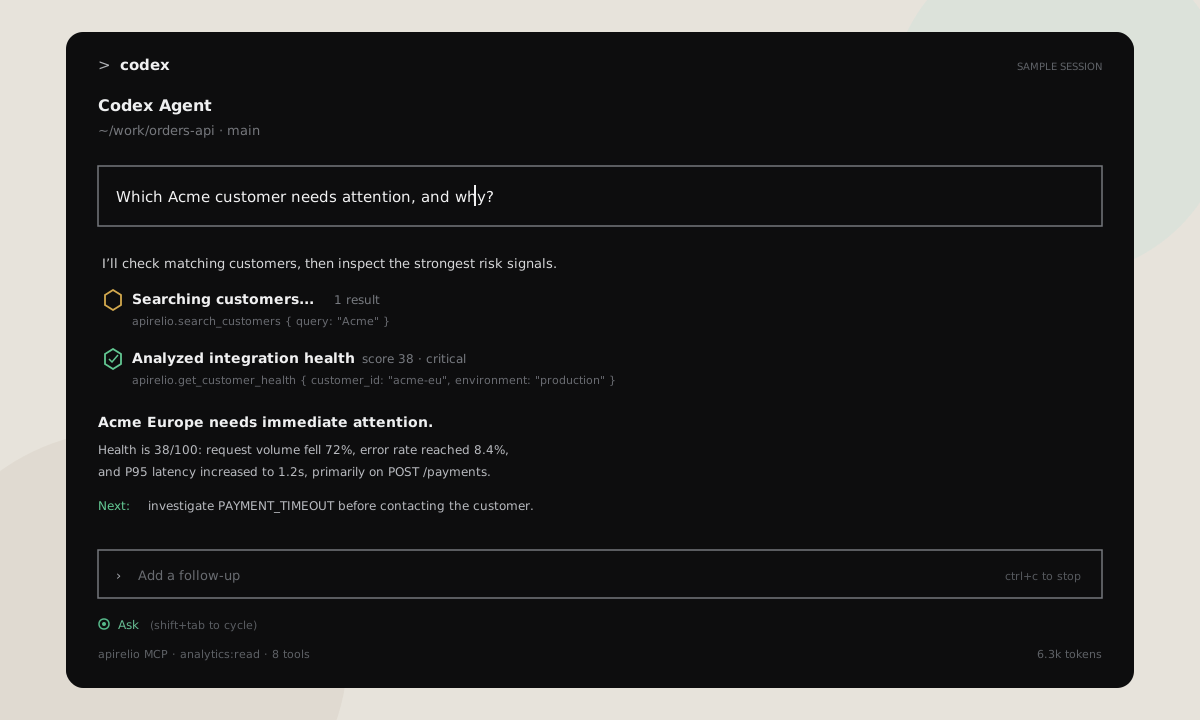
This anonymized OpenAI Codex session shows two typical workflows. Codex selects explicit Apirelio tools, receives bounded structured analytics and turns the returned metrics into an evidence-based answer.
Capabilities
Eight explicit analytics tools.
get_project
Safe project context and connection status.
get_attention_items
Prioritized critical and warning items.
search_customers
Resolve a customer name to a stable ID.
get_customer_health
Explain one customer health score and risks.
investigate_incident
Aggregate diagnosis for a stable error code.
compare_release
Compare a release with its baseline.
summarize_changes
Compare a period with the preceding period.
get_integration_journey
Integration funnel and stalled customers.
There is no general SQL, HTTP, URL-fetch or arbitrary analytics-query tool. Default periods cover the last seven days and cannot exceed 90 days.
Tool results include a dashboard link that preserves the analyzed UTC period, environment and relevant customer, incident, release, search or journey filters. If sign-in is required, Apirelio returns you to the same filtered view afterward.
Ask
Questions grounded in evidence.
- Which customers need attention this week, and why?
- Did release 2026.08.4 improve reliability?
- Investigate error code PAYMENT_TIMEOUT in production.
- Which integrations are stalled before regular usage?
Tool summaries are deterministic. Your MCP client decides how to combine the returned metrics into its answer.
Responsibility
Keep project credentials scoped.
OAuth access is limited to one project and analytics:read. Access tokens expire after one hour, refresh tokens rotate, and owners can revoke an app immediately from AI & MCP. Store personal-token fallbacks in secret storage, never source control or a URL.
Analytics sent to an AI client are subject to that client's processing, privacy and retention rules. Review them before connecting production projects.
Recover
Authentication and limits.
UNAUTHENTICATED means sign-in is required or the credential is invalid, expired, revoked or belongs to another project. Reconnect from /mcp or codex mcp login. A valid credential without analytics:read receives FORBIDDEN.
A rate-limited response means the connection exceeded its per-minute allowance. Retry after the indicated window. For oversized or slow analytics, shorten the period or lower the requested list limit.