Model Context Protocol guide
Use an MCP server for API monitoring.
Connect Claude Code or OpenAI Codex to customer-aware API analytics, then investigate incidents, unhealthy integrations and release regressions without leaving your coding agent.
Coding agents understand source code. They do not automatically know which customer integrations are failing in production, whether a new release changed API reliability, or which accounts remain on an old API version.
An API monitoring MCP server closes that gap through explicit tools. The agent asks for a bounded analysis, the monitoring system computes it from existing telemetry, and the agent explains the evidence. This is materially different from giving a model direct database access or sending raw logs into a prompt.
01 · The role of MCP
Connect an AI client to operations, not to arbitrary data.
Model Context Protocol is an open standard for connecting AI applications to external tools and data sources. For API monitoring, the useful boundary is a small set of named operations rather than a general query interface.
Your API
Framework SDKs emit normalized route, reliability, latency, release and customer context.
Apirelio analytics
Deterministic services calculate customer health, incident impact and period comparisons.
MCP tools
Eight explicit read-only tools return bounded structured results for one project.
Your coding agent
Claude Code or Codex turns the returned metrics into a concise explanation.
The MCP server exposes deterministic analytics. Your existing AI client decides when to call a tool and how to present its result, so Apirelio requires no OpenAI or Anthropic API key.
02 · Runtime context
Source code explains what can happen. Production analytics show who is affected.
A coding agent can inspect handlers, tests and schemas. It still needs trusted operational evidence to prioritize a customer-facing incident.
What the agent already sees
- Route and controller implementation
- Error handling and tests
- Recent code changes
- Configuration and dependencies
What production adds
- Affected customers and integrations
- Error rate and P95 latency changes
- Release and API-version impact
- Stalled onboarding and activity drops
Together, those contexts support a better investigation. The agent can identify the affected account and endpoint through Apirelio, inspect the relevant implementation in the repository, and propose a focused next step. The MCP result is evidence for the workflow, not a replacement for logs, traces or a safe reproduction.
03 · API monitoring workflows
Ask operational questions with customer context.
The strongest use cases combine a concrete production question with bounded dimensions and an explicit time period.
Prioritize customer risk
Find critical and warning accounts, then explain the activity, reliability, performance and adoption signals behind each health score.
Investigate an API incident
Analyze one stable error code by occurrence trend, affected endpoints, customers, releases and API versions without returning raw events.
Compare a release
Measure success-rate and P95-latency changes against the preceding equal-duration baseline and identify impacted customers.
Explain what changed
Compare traffic, error rate, latency, endpoints, customers and new errors with the immediately preceding period.
Track integration journeys
Review first request, first success, production adoption, time-to-value and customers stalled before regular usage.
Resolve customer identity
Search by an account name, retrieve its stable external ID and use that identifier in customer-specific analytics tools.
04 · Example session
From a prompt to customer evidence.
In this anonymized example, the coding agent resolves a customer, calls the customer-health tool and explains the metrics returned by Apirelio.
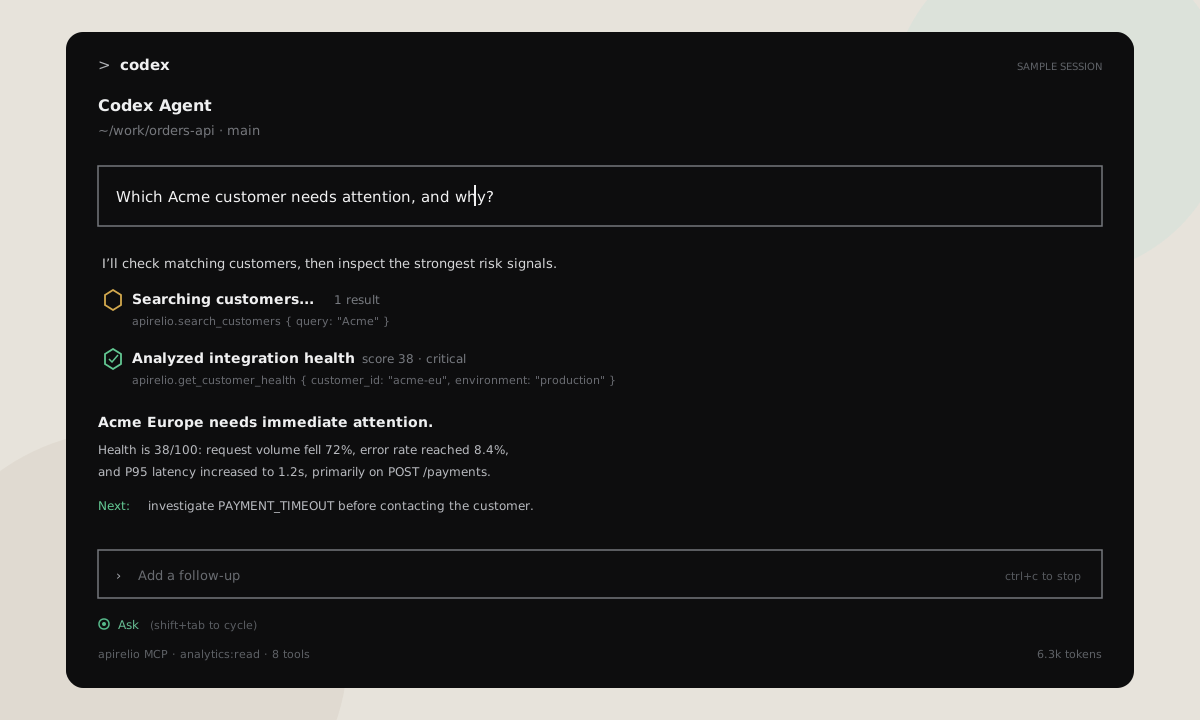
Illustrative sample data. The animation alternates between a customer-health investigation and a release-impact comparison.
05 · Security boundary
Read-only by design and isolated by project.
An AI integration should not turn observability into an unbounded data-access layer. Apirelio applies the same tenant boundary before any tool can run.
Claude Code and Codex discover authorization automatically. Access tokens are short lived and refresh tokens rotate after every use.
The route project, OAuth resource and analytics context must match. Cross-project requests return the same generic authentication failure.
All tools carry only analytics:read. There is no generic SQL, HTTP, URL-fetch or write operation.
Periods, list lengths, request bodies, result size, execution time and per-connection request rate are capped.
Tools expose aggregate operational evidence. Incident investigation deliberately removes recent raw event records.
Audit rows record the project, connection, tool, status, duration and result size, never arguments, results or credentials.
The connected AI provider will process the analytics returned to its client. Review that provider's privacy and retention terms before connecting a production project. Apirelio's own telemetry model keeps request bodies, response bodies, credentials, cookies, query values, email addresses and client IP addresses out.
06 · Connect your client
Use the project URL and sign in through your browser.
Copy the complete Server URL from the project's AI & MCP page. Claude Code or Codex discovers Apirelio OAuth, opens the consent screen and stores its credentials after an owner approves read-only access.
Claude Code
Place this configuration in .mcp.json, then open /mcp or run claude mcp login apirelio.
{
  "mcpServers": {
    "apirelio": {
      "type": "http",
      "url": "https://apirelio.com/mcp/projects/YOUR_PROJECT_ID"
    }
  }
}
OpenAI Codex
Add this table to ~/.codex/config.toml, then run codex mcp login apirelio.
[mcp_servers.apirelio]
url = "https://apirelio.com/mcp/projects/YOUR_PROJECT_ID"
auth = "oauth"
startup_timeout_sec = 30
tool_timeout_sec = 60
enabled = trueIt is a placeholder. If the Apirelio project page shows a URL ending in /projects/17, use 17. Copying the complete Server URL avoids configuration mistakes.
Using several projects
Create one connection per project and register each under a descriptive client-side name, such as apirelio-orders and apirelio-billing. The coding agent can use both servers in one session, while each credential remains unable to cross its own project boundary.
07 · Prompts to try
Start with a decision, account or release.
Good prompts state the operational question and let the agent select the narrowest available tools.
“Which production customers need attention this week, and what evidence explains the ranking?”
“Find Acme, then explain its integration health compared with the previous seven days.”
“Investigate PAYMENT_TIMEOUT. Which endpoints, customers and releases are most affected?”
“Did release 2026.08.4 create a regression in success rate or P95 latency?”
“Summarize what changed in production compared with the preceding period.”
“Which integrations are stalled before regular production usage, and what should happen next?”
Questions
Frequently asked questions.
What is an MCP server for API monitoring?+
It is a Model Context Protocol server that gives a compatible AI client access to bounded API monitoring tools. Instead of exposing arbitrary SQL or raw telemetry, Apirelio exposes explicit read-only operations for customer health, incidents, releases, changes and integration journeys.
Can Claude Code and OpenAI Codex use the same MCP server?+
Yes. Both support remote Streamable HTTP MCP servers and OAuth 2.1 discovery. Each client uses the project URL, opens Apirelio in a browser and stores its own project-scoped OAuth credentials after owner consent.
Does Apirelio send API payloads to the coding agent?+
No. Apirelio does not capture request or response bodies. MCP tools return bounded aggregate analytics such as stable customer IDs, route templates, rates, counts, releases and latency metrics. The connected AI provider then processes the specific tool results requested by the user.
Can one MCP authorization access multiple projects?+
No. Every OAuth grant belongs to one project and carries only the analytics:read scope. To use several projects, register each endpoint under a descriptive name and authorize each project once.
Does the MCP integration require an OpenAI or Anthropic API key in Apirelio?+
No. Apirelio provides deterministic analytics tools and never calls a language model. The user connects Apirelio to an AI client they already use, such as Claude Code or OpenAI Codex.
Bring customer context into your agent
Investigate the API your customers actually use.
Create a project, connect your framework and give Claude Code or Codex secure read-only access to the resulting analytics.